Skip to content

Dallas Marks

Documenting my adventures, daring and mundane, with analytics and cloud computing

  • Home
  • About Dallas Marks
  • Books
  • Writing
  • Speaking
  • Copyright and Disclaimer

Tag: QaaWS

Platform

New Xcelsius Servers in SAP BusinessObjects Enterprise XI 3.1 SP3

Dallas MarksMarch 28, 2011

The debut of the Dashboard Cache Server and Dashboard Processing Server

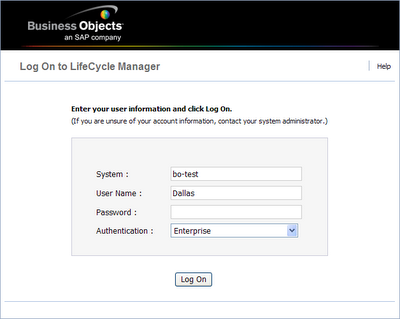
Business Objects Lifecycle Manager – first impressions
Administration & Security

Business Objects Lifecycle Manager – first impressions

Dallas MarksDecember 3, 2008April 24, 2017

My first impressions of LifeCycle Manager for SAP BusinessObjects Enterprise XI 3.1

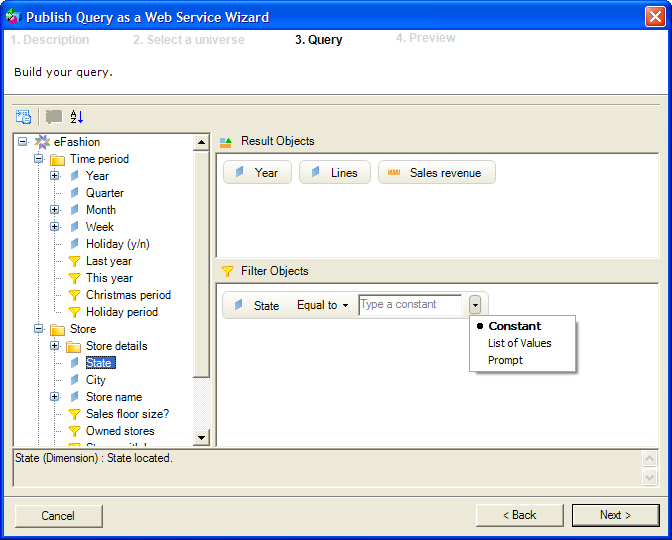
What I miss in the Query as a Web Service (QaaWS) and Live Office query panels
Dashboards

What I miss in the Query as a Web Service (QaaWS) and Live Office query panels

Dallas MarksNovember 10, 2008July 20, 2017

I’ve been using Query as a Web Service (QaaWS) as the means to bring live data into executive dashboards. Sometimes,…

Dashboards

Fixpack 1 released for Xcelsius 2008 SP1 – an update

Dallas MarksNovember 5, 2008April 24, 2017

In a previous post, I had indicated that my initial reaction to Fixpack 1 was mixed. Although some of my…

Fixpack 1 released for Xcelsius 2008 SP1 – but use with caution!
Dashboards

Fixpack 1 released for Xcelsius 2008 SP1 – but use with caution!

Dallas MarksNovember 3, 2008April 28, 2017

I learned on the Business Objects Board (BOB) this morning that Fixpack 1 has been released for Xcelsius 2008 SP1.…

Xcelsius and Session Management in SAP BusinessObjects Enterprise XI 3.0
Administration & Security, Dashboards

Xcelsius and Session Management in SAP BusinessObjects Enterprise XI 3.0

Dallas MarksOctober 23, 2008April 28, 2017

Increasing session timeouts for Xcelsius dashboards.

Lessons Learned on My Recent Xcelsius 2008 Project
Dashboards

Lessons Learned on My Recent Xcelsius 2008 Project

Dallas MarksAugust 22, 2008July 25, 2017

I’ve been working on an executive dashboard using SAP BusinessObjects Enterprise XI 3.0 and Xcelsius 2008 SP1. I wanted to…

Customizing SAP BusinessObjects Enterprise XI 3.1
Administration & Security

Customizing SAP BusinessObjects Enterprise XI 3.1

Dallas MarksAugust 6, 2008March 26, 2018

Learn how to customize the InfoView login screen, replace the default logo, and adjust the default paper size.
About Dallas Marks

Dallas Marks

Dallas Marks

As a cloud and analytics practitioner, author, instructional designer, and trainer, I help organizations harness the power of analytics in the cloud, on-premise, or hybrid. I prefer piano keyboards over computer keyboards when not blogging or tweeting about analytics.

View Full Profile →

  • Bluesky
  • Facebook
  • GitHub
  • LinkedIn
  • X
  • YouTube

Subscribe to Blog via Email

Enter your email address to subscribe to this blog and receive notifications of new posts by email.

Join 3,139 other subscribers

Recent Posts

  • The Logo Doesn’t Matter When the Food Is Cold October 31, 2025
  • SAP Should Join the Open Semantic Interchange (OSI) October 30, 2025
  • SAP Crystal Reports Resume Tips October 22, 2025
  • My Honest Review of Tron: Ares October 17, 2025
  • Is it a bug or a feature? October 1, 2025

Categories

  • Administration & Security (50)
  • Book Review (72)
  • Business Intelligence (45)
  • Career (21)
  • Certification (3)
  • Cloud Computing (3)
  • Crystal Reports (1)
  • Dallas Marks (39)
  • Dashboards (31)
  • Data Visualization (7)
  • Diversified Semantic Layer (10)
  • Lumira & Explorer (46)
  • Mobile BI (45)
  • Odds and Ends (53)
  • Platform (76)
  • Presentation Skills (9)
  • Reporting (50)
  • SAP (22)
  • Semantic Layer (25)
  • SQL (2)
  • User Groups & Conferences (80)
  • What I'm Watching (22)

Top Posts & Pages

  • My Honest Review of Tron: Ares
    My Honest Review of Tron: Ares
  • SAP Crystal Reports Resume Tips
    SAP Crystal Reports Resume Tips
  • Customizing SAP BusinessObjects BI 4.1 and BI 4.2
    Customizing SAP BusinessObjects BI 4.1 and BI 4.2
Privacy & Cookies: This site uses cookies. By continuing to use this website, you agree to their use.

To find out more, including how to control cookies, see here: Cookie Policy

This site is created and managed by The Delgallo Company.

Copyright © 2025 Dallas Marks | Fresh News by Ascendoor | Powered by WordPress.